Minimize
Blogger List

Johannes Ahrends
Toad and Oracle

Ben Boise
Toad SC Discussions

Kevin Dalton
Benchmark Factory

Steven Feuerstein
PL/SQL Obsession

Devin Gallagher
Toad SC discussions

Stuart Hodgins
JProbe Discussions

  Henrik "Mauritz" Johnson
Toad Tips & Tricks on the "other" Toads
  Mark Kurtz
Toad SC discussions
  Michael Lumbard
Toad SC discussions
Daniel Norwood
Toad for Data Analysts,
Toad Extension for Visual Studio
Debbie Peabody
Toad for Data Analysts
Gary Piper
Toad Reports Manager
John Pocknell
Toad for Oracle, JProbe
Kuljit Sangha
Toad SC discussions
Bert Scalzo Indicates Oracle ACE status
Toad for Oracle, Data Modeling, Benchmarking
Jeff Smith
Toad product family
Richard To
SQL Optimization
Jim Wankowski
DB2 - LUW and z/OS
John Weathington
  Toad Data Modeler Opens in a new window
Data Modeling
 
  Real Automated Code Testing for Oracle
Quest Code Tester blog
 
Minimize
Blog Tags
toad for oracle (122)
oracle (62)
plsql (46)
sql optimization (37)
toad for data analysts (28)
code tester (19)
toad for ibm db2 (13)
automation (11)
batch optimizer (10)
virtualization (10)
schema browser (9)
toad for sql server (9)
data grid (8)
sql (8)
sql editor (8)
toad data modeler (8)
benchmark factory (7)
excel (7)
query builder (7)
report manager (7)
toad extension (7)
visual studio (7)
11g (6)
configuration (6)
freeware (6)
health check (6)
vmware (6)
connect (5)
dba module (5)
er diagrammer (5)
F4 (5)
linux (5)
refactoring (5)
spotlight (5)
unicode (5)
compare (4)
debugger (4)
export (4)
formatter (4)
make code (4)
rman (4)
strip code (4)
benchmark (3)
bfscript (3)
bulk collect (3)
code templates (3)
code xpert (3)
database browser (3)
db2 (3)
notebook (3)
oem (3)
RAC (3)
session browser (3)
speed (3)
sql optimizer (3)
toad for mysql (3)
tpc-c (3)
9.7 (2)
alert log (2)
app designer (2)
awr (2)
code insight (2)
code snippets (2)
collection (2)
compare and sync (2)
compliance (2)
data generator (2)
data warehouse (2)
database explorer (2)
database monitor (2)
explain (2)
forall (2)
ftp (2)
group execute (2)
handbook (2)
installation (2)
job scheduler (2)
multi-task (2)
nested table (2)
os command (2)
profiler (2)
recovery (2)
release history (2)
save as (2)
schema compare (2)
sql recall (2)
stats pack (2)
subversion (2)
team coding (2)
trace file browser (2)
while loop (2)
10g (1)
64 bit (1)
7zip (1)
action (1)
addm (1)
alter (1)
ansi join (1)
array (1)
ccleaner (1)
code coverage (1)
code road map (1)
CRON (1)
cursor for loop (1)
data browser (1)
data subset (1)
database probe (1)
dbms_flashback (1)
dbms_profiler (1)
ddl (1)
feuerstein (1)
filezilla (1)
flash drive (1)
flow control (1)
for loop (1)
group policy manager (1)
hints (1)
import (1)
index (1)
inheritance (1)
invoker rights (1)
ipad (1)
java (1)
latency (1)
log switch (1)
logical model (1)
ltrim (1)
master-detail browser (1)
monitor (1)
multi-select (1)
naming standards (1)
network (1)
object explorer (1)
OEBS (1)
package (1)
parser (1)
partitioning (1)
performance (1)
pragma (1)
project manager (1)
RAT (1)
revo (1)
REXEC (1)
schema report (1)
script manager (1)
search (1)
set operator (1)
sga (1)
slow (1)
sonarsource (1)
source control (1)
space projection (1)
sql monitor (1)
sql navigator (1)
sql script (1)
sql tracker (1)
sql*plus (1)
standards (1)
statistics (1)
stored procedure (1)
string parser (1)
sub-model (1)
sub-type (1)
synch (1)
synchback (1)
TELNET (1)
toad (1)
trace (1)
unit test (1)
unix (1)
usb (1)
utility (1)
v10 (1)
v9.5 (1)
version control (1)
waits (1)
workload replay (1)
workspace (1)
xml (1)
 
WELCOME, GUEST


Blogs
Toad and Database Commentaries

Toad World blogs are a mix of insightful how-tos from Quest experts as well as their commentary on experiences with new database technologies.  Have some views of your own to share?  Post your comments!  Note:  Comments are restricted to registered Toad World users.

Do you have a topic that you'd like discussed?  We'd love to hear from you.  Send us your idea for a blog topic.


Jul 7

Written by: John Pocknell
Tuesday, July 07, 2009  RssIcon

You may already be familiar with the Toad World Exclusive Freeware area from where you can download and use really useful utilities such as the PL/Vision Code Library and the Freeware version of Quest Code Tester for Oracle.
 
Now there are two more which I’d like to introduce you to – one which has been around for many years and the other a relative newcomer.
 
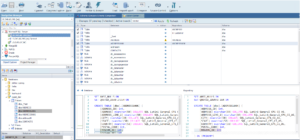
The first one is called SQL Monitor. Some of you may have already come across it since it’s included with Toad for Oracle and can be launched from Toad’s UI via the External Tools button.

 
Launching SQL Monitor from Toad for Oracle

 
For those of you less familiar with the SQL Monitor, let me explain what it does.
 
SQL Monitor is a utility that monitors Oracle, MySQL, and DB2 Client DLL calls, allowing you to capture all SQL calls a program sends to the database via the client DLLs.
 
In Oracle, for example, this would include Toad for Oracle, SQL*Plus, SQL Developer, etc.
 
Originally built by the Toad development team to help with troubleshooting, many users have already found this to be an extremely useful utility.

 
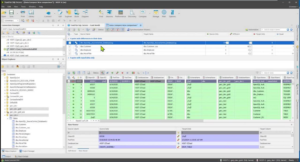
SQL Monitor monitoring Toad for Oracle session SQL

The main window of the program consists of two parts:

Left pane

Applications

Click this tab to see a list of Windows applications that are connected to Oracle, DB2 or MySQL. These may include sqlplusw.exe, Toad, etc. 

Services

Click the Services tab to see a list of the Windows NT services that are connected to Oracle. For example, these may include Oracle itself, third-party application servers that run as NT services, etc.

Right pane

The right pane contains a tab for each process being monitored. Click the appropriate tab to see the process.  

Monitoring Processes

In the left pane, select the process you want to monitor by clicking the checkbox.

If you want to monitor an application that is not running, you can click the Launch button on the toolbar, or press . The new application will start and you can monitor it from the time it starts running.

Major features of SQL Monitor include:
  • Supports Windows NT/2000/XP
  • Supports Oracle clients starting with version 7.3
  • Displays SQL statements that come from processes in real-time, eliminating the necessity to turn on tracing and look into poorly formatted trace file
  • Allows monitoring NT services
  • Displays logon attempts, both successful and unsuccessful (username, password, TNS alias, success)
  • Performs syntax highlighting
  • Displays values of bind variables for SQL statements
  • Shows even statements that fail to execute. Displays Oracle error code and message for those statements.
  • Allows you to copy and paste statements from the output to one of your SQL analyzing tools (Toad, SQL Navigator, or even SQL*Plus)
  • Monitors applications like Import/Export, SQL*Loader, Server Manager (svrmgrl.exe), as well as applications written with Oracle Forms or Pro*C
To download SQL Monitor, simply click this link or go to the Exclusive Toad World Downloads page from the Downloads tab on the home page.
 
We would be more than happy for you to tell us what you think about SQL Monitor should you go ahead and try it out. That way, we can look at improving it further.
 
Please post a comment at the end of this blog.
 

Tags: sql monitor , oracle , sql
Categories:

13 comment(s) so far...


Re: Introducing a New Free Utility Download – SQL Monitor

Hi what is the difference Between that and the one shipped for instance with SQL Navigator? (It seems a new version but besides that is the same app, right? (same funcionality)) Thanks

By FilipeSilva on   Friday, July 10, 2009

Re: Introducing a New Free Utility Download – SQL Monitor

Hi Filipe, It's the same thing.

By Pockers on   Friday, July 10, 2009

Re: Introducing a New Free Utility Download – SQL Monitor

I just tried using SQL Monitor via TOAD (9.7.2.5). It keeps hanging up with "Not Responding".

By berendtium111 on   Wednesday, August 05, 2009

Re: Introducing a New Free Utility Download – SQL Monitor

Hi, Which Windows OS are you using and which applications are you trying to monitor? John

By Pockers on   Wednesday, August 05, 2009

Re: Introducing a New Free Utility Download – SQL Monitor

XP Pro. I had clicked on frmbld.exe, toad.exe and frmweb.exe. Just clicking on the tabs on the right caused monitor to lock up. Sometimes it doesn't lock up but then when I go to my running web form, that screen is locked up.

By berendtium111 on   Wednesday, August 05, 2009

Re: Introducing a New Free Utility Download – SQL Monitor

OK thanks. Let me check with my dev team whether we are ok with Oracle Web Forms. John

By Pockers on   Wednesday, August 05, 2009

Re: Introducing a New Free Utility Download – SQL Monitor

Hi John, I work almost entirely (99.99999999.....% in Clinical Data Validation (both CT and OC) . I see very little discussion on this topic. I can use some advice. (I cannot connect to OL fron this email account). Thanks for your patience. Deon

By Deon on   Tuesday, August 11, 2009

Re: Introducing a New Free Utility Download – SQL Monitor

Hi Deon, This sounds like a general question on Toad. Could you please email me direct (john.pocknell@quest.com) and describe what requirements and issues you are currently having and I can advise you on the best solution. Thanks, John

By Pockers on   Tuesday, August 25, 2009

Re: Introducing a New Free Utility Download – SQL Monitor

Response to berendtium111: I checked with my dev team and the SQL Monitor is very unlikely to work with Oracle Web Forms since it's a very old utility and doesn't receive the updates a commercial product like Toad does. Regards, John

By Pockers on   Tuesday, August 25, 2009

Re: Introducing a New Free Utility Download – SQL Monitor

Hi, I try to monitor Services on a Win 2K3-SA SP1 running under a local user account with local administrator permissions. Unfortunately I can only see the services running under Local System. Running the SQLMonitor.exe with these local user account credentials does not result in a solution. Nor starting the service from within the SQLMonitor.exe does not work. How can I monitor Services running under another account then Local System? Best Regards, Leo

By BenG on   Wednesday, August 26, 2009

Re: Introducing a New Free Utility Download – SQL Monitor

I recommended SQL Monitor to one of our QA folks for testing our application written in VB6 and C# on .Net 3.x. SQL Monitor crashes the application every time.

By dclamage on   Tuesday, December 01, 2009

Re: Introducing a New Free Utility Download – SQL Monitor

Hi Leo, Sorry about the late response! Our dev team were able to re-create this issue but as yet not been ablle to rectify it. I will update you if there are any developments. John

By Pockers on   Wednesday, December 02, 2009

Re: Introducing a New Free Utility Download – SQL Monitor

Hi dclamage, I'm sorry SQL Monitor is causing you problems. I have contacted our development team for advice, but I suspect it will be that SQL Monitor was not designed to operate and therefore hasn't been tested on .Net. I'll update you when I get a response. Thanks, John

By Pockers on   Wednesday, December 02, 2009
Search Blog Entries